- Jul 22, 2026
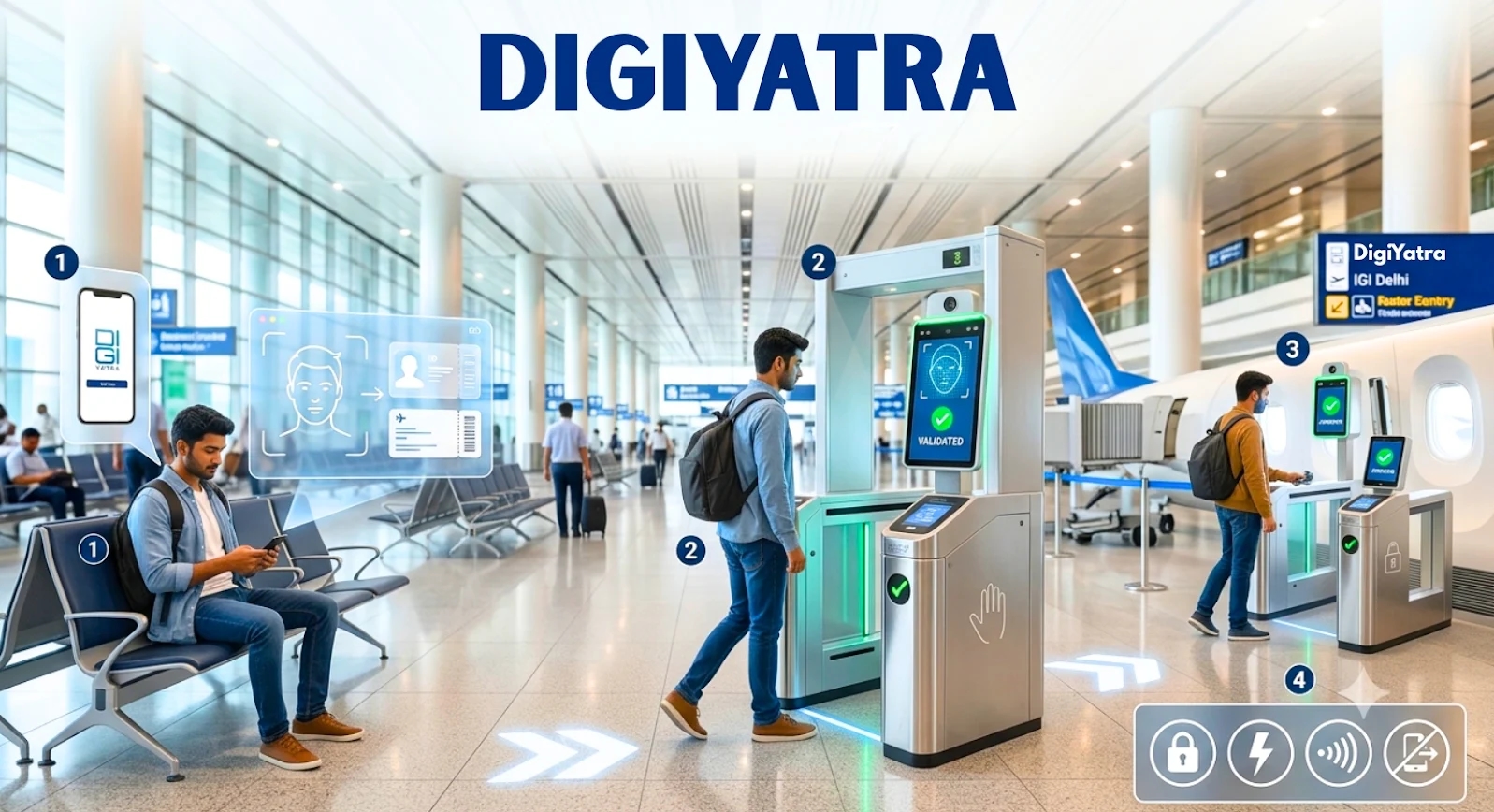
Before your flight departure, the first thought that comes to mind is reaching the airport on time so you can handle airport procedures seamlessly. With the clock ticking, it becomes hard to manage the airport pre-flight formalities. The fear reaches its highest point when you have forgotten to carry a document. To curb such situations in the future and promote sustainability, the Ministry of Civil Aviation introduced the application called DigiYatra, which lets you enter the airport, clear security, and board the flight using facial recognition. So, no boarding pass is required for scanning now. To learn more about the DigiYatra application, the objective it serves, and the registration process, refer to the information in this post for an easy flight journey you've always wanted.
What is DigiYatra?
DigiYatra is a voluntary facial biometric, app-based system developed by the Ministry of Civil Aviation (MOCA) and the Digi Yatra Foundation. The application is used to verify the identity of domestic air travellers at some particular airports in India. With the help of the application, you can save all your IDs and travel documents in one place and remove any hassle from the process that you might face at the airports. Since there are multiple checkpoints at the airport, you also need to show the boarding pass and the ID to pass through the process, but now all that can be managed through the application. Eligible passengers can use the facial authentication feature to pass the checks at the airport.
Key Objectives of DigiYatra
DigiYatra was introduced not just as an application but also as an initiative designed to make travelling seamless and contactless at the airport. The application serves plenty of objectives but has mainly made the entire procedure at the airport seamless and hassle-free. Instead of spending hours at the airport trying to queue and manage at the checkpoints, you can switch to being smarter. Below are some of the key objectives that DigiYatra is serving:
- Improved Security: With the DigiYatra application, airport security is enhanced through facial recognition features to create a decentralised, verified digital identity. This also eliminates the reliance on physical documents that can be easily forged while ensuring that the passenger information also remains encrypted and private.
- Convenient: Through DigiYatra, your air travel will be transformed into a seamless, contactless and paperless experience. It brings convenience and ease to airport procedures by eliminating the need to show a physical boarding pass and IDs, allowing you to complete the process within 5 seconds.
- Data Privacy Protection: DigiYatra uses a Privacy by Design architecture that uses an encrypted facial biometric token that sits on your smartphone. Your data is not accessed without permission and is only shared for authenticated journeys, then automatically purged by airport systems within 24 hours.
- Efficiency at the Airport: By eliminating the need for physical documents at the airport, such as the boarding pass, passport, and Aadhaar Card, the process becomes much easier and more seamless. Across the various checkpoints, you can use the application and optimise the entire process.
Significant Features of DigiYatra
DigiYatra has some of the highly praised features that are turning heads. People want to avoid standing in long queues and complete manual verification with a stack of documents that is barely manageable. DigiYatra comes to the rescue by providing some standout features that make the application highly regarded by travellers. Some of the key features of DigiYatra are mentioned below:
- Paperless Travel: You need not carry any physical boarding passes or ID cards for the pre-flight formalities. All your documents and the information are saved and stored digitally, so that you can access them easily through the application.
- Quick Identification: Using the feature of facial recognition, the application completes the process within seconds, while it might take a while when you rely on physical documents at the airport. Through the application, the need for manual checking at the airport is reduced, eliminating the need to stand in long queues while also arriving early.
- Enhanced Data Security: The data you provide in the application is not stored in a central database or with the DigiYatra Foundation. All the provided data is stored in the personal wallet of the smartphone. The data is only shared between the passenger and the airport of the travel origin where the ID will be checked and verified. Since the data is encrypted, it cannot be used by any other entity unless voluntarily stated.
- Environment-Friendly: Instead of carrying soft copies and hard copies of documents and IDs at the airport, digitisation actually proves beneficial for the environment as it is an eco-friendly approach. It replaces the need to carry physical documents and reduces paper waste and airport queues. DigiYatra actively supports sustainability goals.
How to Register for DigiYatra?
DigiYatra requires you to pre-register before using the services. To complete the registration, you need to have some documents for verification, such as the Aadhaar-linked mobile number, valid photo ID, Email Address and flight ticket details. Make sure that the documents you provide for verification are up-to-date and error-free. If you want to complete the DigiYatra registration without any error or issue, then refer to the steps mentioned below and travel hassle-free:
- Download the DigiYatra application from the Google Play Store or the App Store.
- Register using the contact number linked to Aadhaar.
- You will receive the OTP on the same number provided.
- Access your DigiLocker for your login credentials or provide them directly.
- Click a picture for facial verification with the documents provided.
- Upload the boarding pass barcode for your travel.
- Check the details on the boarding pass and ensure they are correct.
- Navigate to find the option to share the travel credentials with the origin airport.
- You will get the confirmation within 24 hours to 60 minutes before the flight.
Which Airports Support DigiYatra?
DigiYatra currently supports almost 38 airports across the nation. Using the biometric-enabled program, the ministry has made the entire pre-flight formalities paperless. While the application is available at dozens of locations, the service requires passengers to complete the registration first. You should know that availability may occasionally vary by terminal. Below are the major airports that DigiYatra supports:
| Indira Gandhi International Airport, Delhi (DEL) | Chhatrapati Shivaji Maharaj International Airport, Mumbai (BOM) |
| Navi Mumbai International Airport, Navi Mumbai (NMI) | Dr. Babasaheb Ambedkar International Airport, Nagpur (NAG) |
| Surat International Airport, Surat (STV) | Bagdogra International Airport, Bagdogra (IXB) |
| Mangaluru International Airport, Mangaluru (IXE) | Coimbatore International Airport, Coimbatore (CJB) |
| Veer Savarkar International Airport, Port Blair (IXZ) | Maharaja Bir Bikram Airport, Agartala (IXA) |
| Bir Tikendrajit International Airport, Imphal (IMF) | Jolly Grant Airport, Dehradun (DED) |
| Jammu Airport, Jammu (IXJ) | Srinagar International Airport, Srinagar (SXR) |
| Chaudhary Charan Singh International Airport, Lucknow (LKO) | Lal Bahadur Shastri International Airport, Varanasi (VNS) |
| Devi Ahilya Bai Holkar Airport, Indore (IDR) | Raja Bhoj Airport, Bhopal (BHO) |
| Swami Vivekananda Airport, Raipur (RPR) | Birsa Munda Airport, Ranchi (IXR) |
| Kempegowda International Airport, Bengaluru (BLR) | Rajiv Gandhi International Airport, Hyderabad (HYD) |
| Chennai International Airport, Chennai (MAA) | Netaji Subhash Chandra Bose International Airport, Kolkata (CCU) |
| Cochin International Airport, Kochi (COK) | Ahmedabad International Airport, Ahmedabad (AMD) |
| Pune International Airport, Pune (PNQ) | Manohar International Airport (Mopa), North Goa (GOX) |
| Dabolim Airport, South Goa (GOI) | Jaipur International Airport, Jaipur (JAI) |
| Sri Guru Ram Dass Jee International Airport, Amritsar (ATQ) | Lokpriya Gopinath Bordoloi International Airport, Guwahati (GAU) |
| Vijayawada Airport, Vijayawada (VGA) | Visakhapatnam International Airport, Visakhapatnam (VTZ) |
| Jay Prakash Narayan Airport, Patna (PAT) | Biju Patnaik International Airport, Bhubaneswar (BBI) |
| Thiruvananthapuram International Airport, Thiruvananthapuram (TRV) | Noida International Airport, Jewar (DXN) |
Conclusion:
The air travel industry in India is going through a major shift. The idea behind the shift is to make travel as seamless as possible. With the introduction of the DigiYatra app, the ministry intends to reduce waiting time, improve overall security, and add convenience to ensure you get the flight journey you wanted. So skip the long queues at the airport and go digital with the DigiYatra application. With this post, you have been provided with the complete information about the DigiYatra application. Use it to make your travel as seamless as possible.
Frequently Asked Questions (FAQs)
1. Can I use DigiYatra for my international travel?
DigiYatra is currently designed and working for domestic flights in India and has not been used for full international departures. The trials have begun at some selected airports. You must use your passport and the boarding pass at the airport checkpoints for international flights.
2. Can I use DigiYatra even if I have a connecting flight?
Yes, you can use DigiYatra for connecting flights. It works seamlessly for your initial departure.
3. Is DigiYatra free to use?
Yes, DigiYatra is completely free to use. Both the app and the biometric airport service come at zero cost.
4. What should I do if DigiYatra fails to recognise my face at the airport?
If DigiYatra fails to recognise your face at the airport, immediately stop retrying and proceed to the regular airport queue.
5. Is DigiYatra compulsory to use for domestic flights?
No, DigiYatra is not mandatory for domestic flights. Using the application and its facial recognition is voluntary. If you prefer the traditional process, you can still use the manual entry lanes by presenting the physical government ID.
6. Do I have to complete the physical verification at the airport as well after using DigiYatra?
No, you do not need to repeat physical document verification for entry, security, and boarding if you are using DigiYatra.
7. Does DigiYatra speed up airport security?
Yes, DigiYatra makes your airport journey seamless so you can spend less time waiting and more time relaxing before the flight.
8. Does the Indira Gandhi International Airport allow completing the verification through DigiYatra?
Yes, Indira Gandhi International Airport supports digital verification through the DigiYatra application.
Contact us